AYN Odin 2 Portal: The 120Hz OLED Handheld's Software Ecosystem
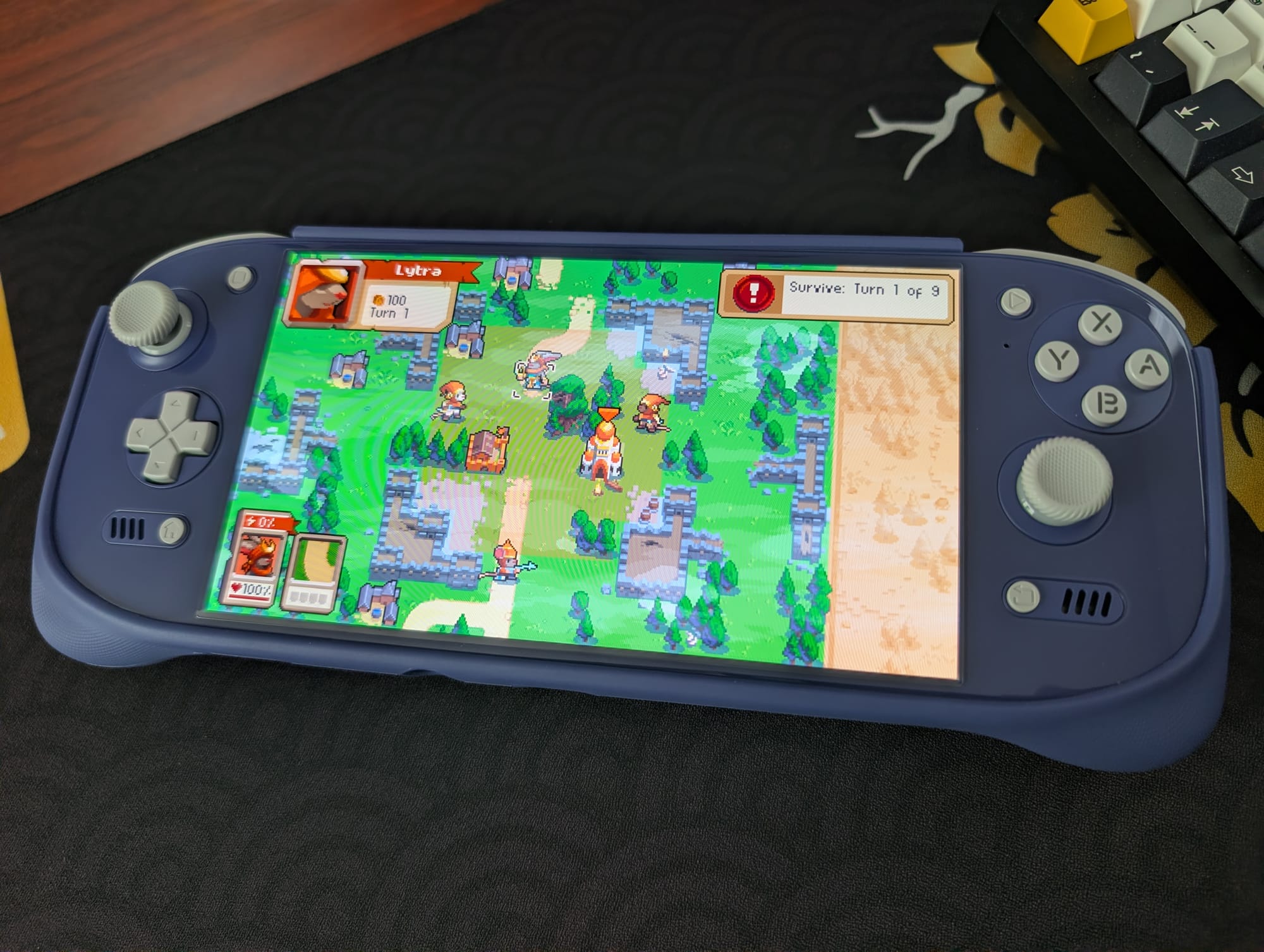
The AYN Odin 2 Portal, a recent addition to the popular Odin line, brings a significant display upgrade to the already powerful Snapdragon 8 Gen 2 platform. While the core processing power remains consistent with its predecessor, the original Odin 2, the Portal's 7-inch, 120Hz OLED screen is a clear statement about AYN's focus on visual fidelity and fluid motion for modern retro enthusiasts.
This device, available in Black, White, and Indigo, offers various RAM and storage configurations. The “Pro” model, with 12GB of RAM and 512GB of internal storage, is widely considered the optimal choice for handling demanding emulation tasks, particularly those involving Android-based PC emulation. The screen, a vibrant Organic Light-Emitting Diode (OLED) panel, provides deeper blacks and better contrast than the IPS (In-Plane Switching) display found on the original Odin 2.
Display First: AYN's Strategic Choice
AYN’s decision to maintain the Snapdragon 8 Gen 2 chipset, rather than pursuing a marginal performance bump, while upgrading the display to a 120Hz OLED, is a considered move. This shows AYN understands that for many users, the visual experience and refresh rate are now as critical as raw processing power. The Snapdragon 8 Gen 2 already offers ample headroom for most emulation and streaming tasks, according to AYN Technologies Official Store. This prioritisation of display quality over a slight performance increase is a telling sign of the maturing handheld market, where user experience often trumps raw numbers.
Official accessories for the Odin 2 Portal include a hard carrying case, a screen protector, a Thermoplastic Polyurethane (TPU) grip, and replacement ABXY buttons and joystick caps. It is worth noting that the official screen protector has a tendency to peel at the bottom edge, and the carrying case does not accommodate the device when the TPU grip is attached, according to Video Game Console Emulator Wikipedia. For those who enjoy customisation, the analog sticks use the same stem as Retroid Pocket devices, opening up options for third-party caps.
Storage Solutions for Your Digital Library
When setting up your Odin 2 Portal, a critical decision involves managing your game files and system BIOS images. You can store these on the device's internal storage or use external options like a microSD card or a portable Solid State Drive (SSD). External storage, such as a Sharge Disk, offers easy file transfer without constant computer involvement, and some users can even play games directly from an SSD.
However, internal storage generally provides faster and more stable performance. For those planning to use PC emulation apps like GameNative or GameHub Lite, reserving internal storage for these applications is often recommended. Using external storage for PC emulation on Android can sometimes lead to performance issues or crashes, which can be frustrating when trying to enjoy a demanding title.
Streamlining Emulator Installation with Obtainium
The days of manually tracking down and installing individual emulators are largely behind us, thanks to tools like Obtainium. This application simplifies the process of installing and updating emulation and gaming software on Android devices. Obtainium provides direct links to developer sources, eliminating the need for users to search for and manage these files themselves.
Crucially, Obtainium also monitors these programmes for updates, alerting you when new versions are available. This ensures your emulators are always current, often bringing performance improvements and bug fixes. The Obtainium Emulation Pack further streamlines this, bundling many essential tools for a quick setup.
The Importance of BIOS Files
While installing emulators gets you most of the way, many disc-based systems require specific BIOS (Basic Input/Output System) files to run games correctly. Systems supported by RetroArch often have their BIOS requirements covered, but platforms like PlayStation 2, Nintendo GameCube, Sega Saturn, Nintendo Switch, and PC Engine CD typically need additional files. Due to copyright restrictions, specific download locations cannot be provided, but resources exist to guide users on which BIOS files are needed and where they should be placed within the device's file structure.
Choosing a launcher or frontend is a matter of personal preference. The AYN Odin 2 Portal includes its own Odin Launcher, which offers a simple interface for accessing emulation and productivity apps. It features a floating bar on the screen's left and right sides, allowing quick access to apps, performance settings, RGB (Red, Green, Blue) lighting adjustments, and system controls like brightness and Wi-Fi.
Beyond Emulation: PC Streaming and Android PC Emulation
The Odin 2 Portal truly shines in PC streaming and Android-based PC emulation, largely due to its 120Hz OLED screen. The high refresh rate and larger display are particularly beneficial for PC games, where small text and detailed user interfaces can be difficult to read on smaller handheld screens. Streaming performance depends heavily on your home network and gaming PC setup.
Artemis, a fork of Moonlight/Sunshine, is a popular choice for streaming PC games to the Odin 2 Portal. Its companion app, Apollo, runs on the streaming PC. For direct PC emulation on Android, GameNative and GameHub Lite are the leading applications. GameNative allows access to your entire Steam library, including cloud saves, while GameHub Lite offers an alternative that may perform better with certain titles. Experimenting with both can help users find the best fit for their game library.
Enhancing the Experience with Utilities and Customisation
Several utilities further enhance the Odin 2 Portal experience. OdinTools provides a collection of functions, including app overrides, button utilities, and quick setting options, and is conveniently included in the Obtainium Emulation Pack. AmbiLuma, previously known as AmbiOdin, allows for dynamic synchronisation of the device's RGB lighting effects, matching the colours displayed on the screen for an immersive visual feedback loop.
RetroAchievements offers a community-driven system for earning achievements in retro video games, adding a modern layer of engagement to classic titles. While it requires an always-online connection, it provides a fresh challenge for those revisiting old favourites. For disc-based games, CHDroid is a useful tool that converts ROM files into the compressed .chd format directly on the device, saving significant storage space for systems like PlayStation 2, Sega Saturn, Dreamcast, and PC Engine CD.
Hardware Controls and System Management
The Odin 2 Portal retains the useful M1 and M2 function buttons on the back, a welcome feature carried over from the original Odin 2. Power and Volume buttons are located along the top, though they can be somewhat challenging to press when using the TPU grip. The Start and Select buttons are positioned at the top-right and top-left of the screen, with the Home button beneath the D-Pad and a Return button under the right analog stick.
Over-the-Air (OTA) updates for the device can be processed through the standard Android quick settings menu, accessed by swiping down from the top of the screen. This menu also provides access to Odin-specific settings, allowing users to fine-tune various aspects of their handheld. For file transfers, Solid Explorer is a robust paid option known for its split-screen layout, while MiXplorer offers a free alternative that is also highly regarded.
Ultimately, the AYN Odin 2 Portal stands out not just for its powerful internals, but for its exceptional 7-inch, 120Hz OLED screen, which truly elevates the experience for both traditional emulation and the growing field of PC streaming and Android-based PC emulation. The extensive software ecosystem, from Obtainium to specialised PC emulation tools, shows how far Android handhelds have come in offering a polished and versatile gaming platform.
Pair the knowledge with the fit. Player Clothing t-shirts are individually numbered, limited-edition runs — retro DNA on cotton.
Follow RetroShell on X for daily retro gaming news. Join the community on r/RetroShell.
Originally published by Retro Handhelds. Read original article.